 ORION
ORIONYour PC can do more than you think.
ORION reads your PC and tells you what to play, with which settings, at what price. All your games in one place, what your machine can run game by game, outdated drivers, and the real best price.
Free, no account, no ads. Version 2.1.1 for Windows 10 and 11. Interface in English and French.
Seven stores, and nobody to tell you what your machine can do.
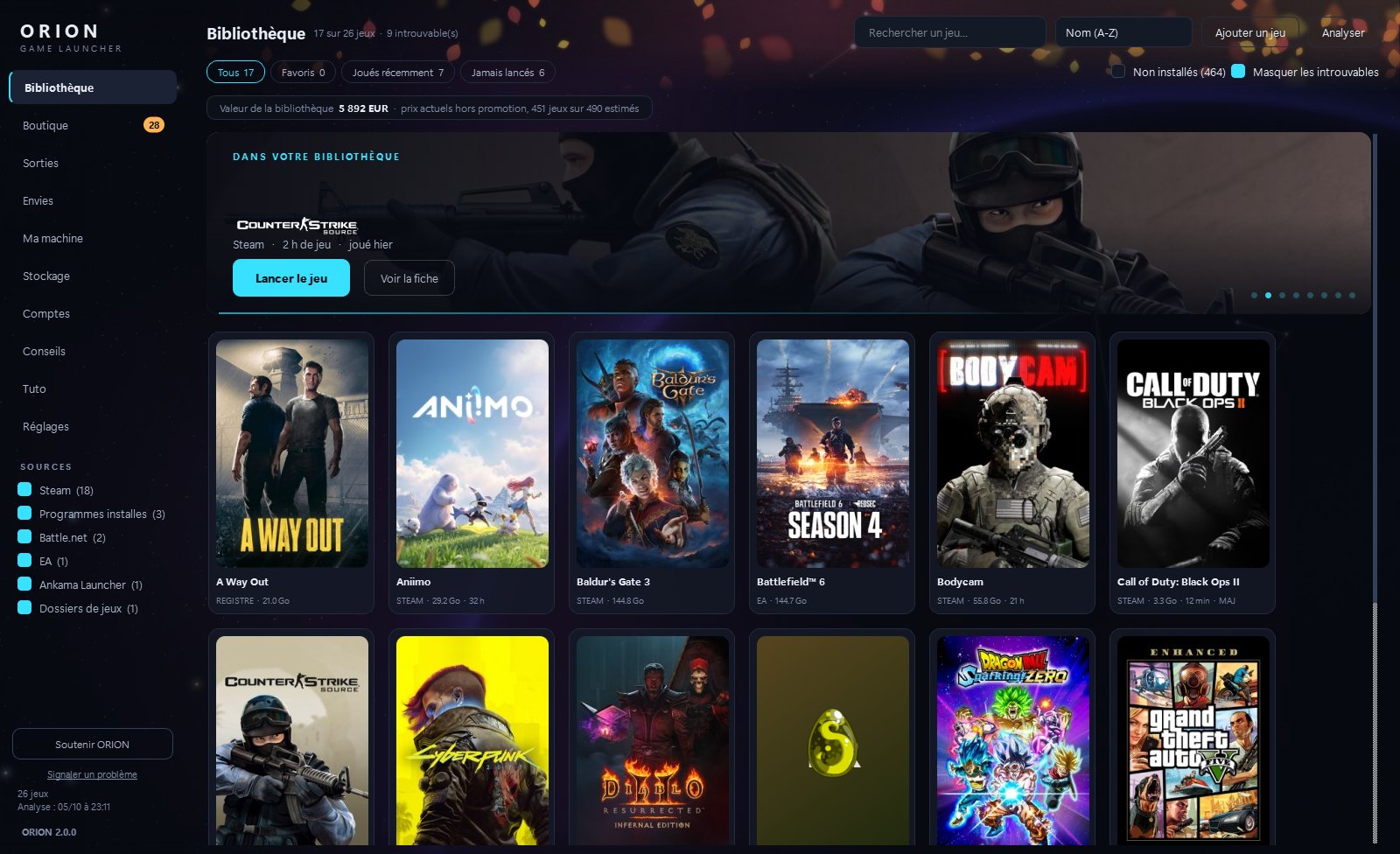
A PC gamer today has Steam, Epic, GOG, Ubisoft Connect, the EA app, Battle.net, the Microsoft Store, and a few games dropped in a folder by hand. Nobody knows what is installed anymore, or where. And with every new game, the same ritual: open the options, guess what each slider costs, look for a guide, test, start over. Meanwhile the 180 Hz display runs at 60 and the graphics card uses half of what it can do.
ORION does not replace Steam or Epic. It sits on top of them, reads your machine, and does the thinking.
One library. Steam, Epic Games, GOG, Xbox, Ubisoft, EA, Battle.net and Ankama games found on your drives, plus the ones you own but haven't installed. One click to play; the owning launcher starts if the game needs it.
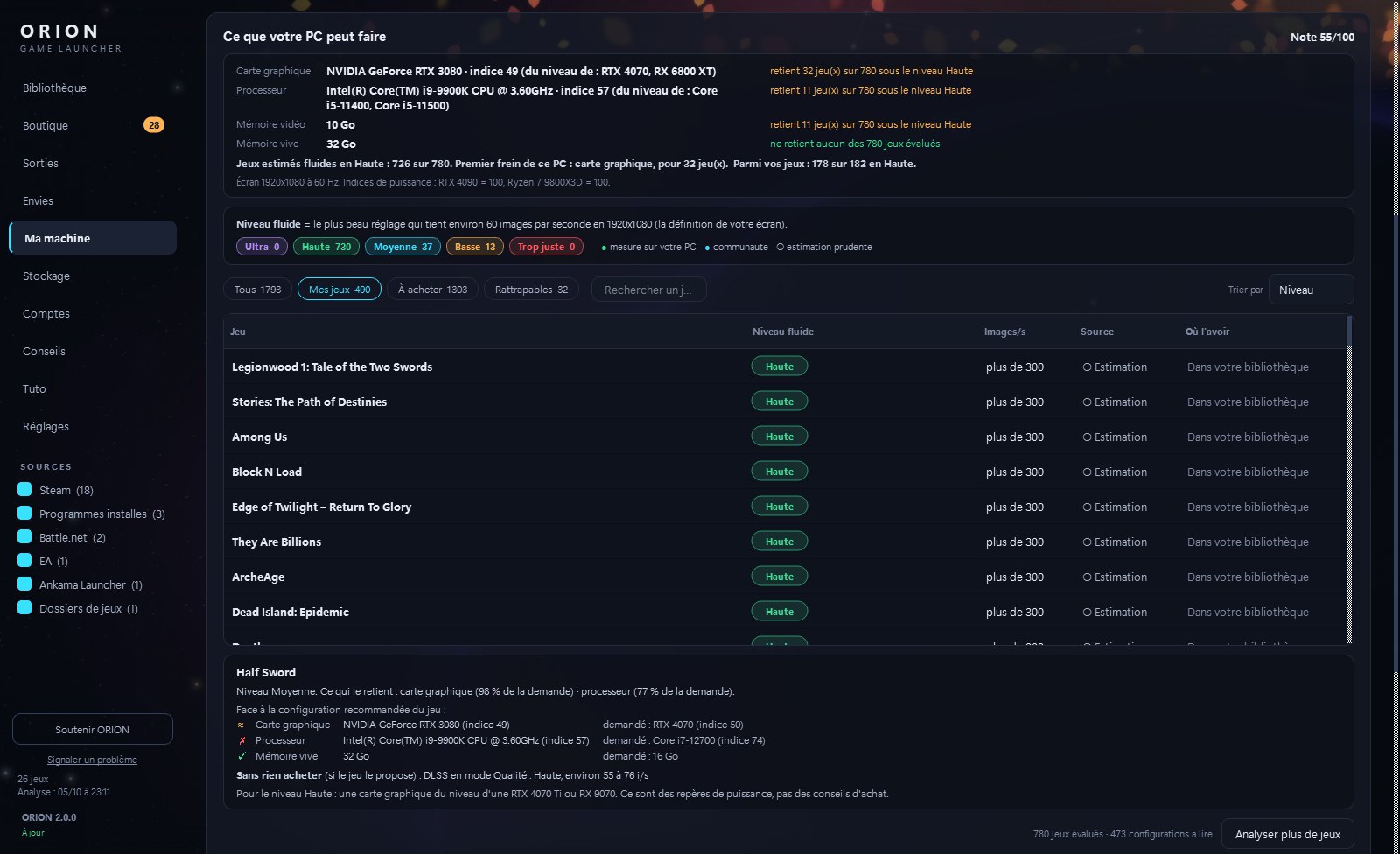
What your PC can run, game by game. For each game, the highest settings level that stays smooth on your hardware and the expected frame rate, estimated from the publisher's requirements, corrected by real measurements shared by players with a similar graphics card, and by your own measurements once you play.
Settings written for you. ORION writes each game's graphics settings for your card and your display, after a backup you can restore in one click. When a game won't let anyone touch its settings, it shows you what to pick in its menus, line by line, in plain words.
Real prices, done properly. Thirty-plus approved stores compared (IsThereAnyDeal data), the free games of the moment, a wishlist that warns you when a game drops. Official stores come first; three long-proven key resellers (Instant Gaming, Kinguin, Loaded) are shown apart, with a visible rule (Steam key, Global region or your own country's, never "gift" or "account" keys).
The big upcoming releases, on PC and consoles, with their countdowns.
Your PC, in one minute. Right after the first install: how many of your games run at High quality, how many drivers need an update, what your library is worth, and whether wishlisted games dropped in price. An image to share ("My PC runs 38 of my 52 games at High quality") is one click away.
The right drivers, by hardware ID.
ORION identifies every chip by its hardware ID, not by its translated name. It checks what Windows Update offers as optional drivers, knows the latest NVIDIA version for your card series, and, on a Dell, Lenovo or HP PC, reads the manufacturer's driver catalog for your exact model — the same source Dell Command Update, Lenovo System Update and HP Image Assistant use. The advice names the version you have, the version published for your model, its date, and the official page.
ORION only says "newer version available" when a source proves it, and it never installs a driver itself: you keep control.
What ORION does not do.
No account to create. No ads. Nothing sent without your consent: a single question, asked once, lets you share anonymous performance measurements and an anonymous usage counter — and if you say no, ORION works exactly the same. Your games, your files, your name: none of it leaves your PC. The page What ORION sends lists everything.
No cheats, no "boosters", no registry tricks. ORION changes a game's settings only when you ask, after a backup. It never touches your other launchers' libraries.
Where the money comes from.
ORION is free. It is funded by donations and by partner links to some stores: if you buy after clicking one, the store may pay the author a commission. The price you pay is the same, and these links never change the order of the offers. No paid placement, ever.
Install ORION.
On first launch, Windows may show "Windows protected your PC". The installer is not code-signed yet (a certificate costs real money every year, which a free project does not commit to at the start). Click "More info", then "Run anyway". To avoid the warning, install from the Microsoft Store.
f112501e2f78d0d83bc8612ff713d94c0003a15d72a525064f197c7172d64f51
- Download Installateur-ORION.exe.
- Double-click it: a window asks for the folder and offers a desktop shortcut. No administrator rights needed.
- ORION starts, reads the machine and finds your games. Allow about fifteen seconds the first time.
The program installs into %LOCALAPPDATA%\Programs\ORION, its data into
%LOCALAPPDATA%\ORION. Nothing anywhere else. Uninstall from Windows' "Installed apps"; it offers to
keep or remove your library. ORION then updates itself: it offers each new version, verifies its fingerprint,
and restarts. Library, settings and backups are kept.
Questions.
Does it work with my games?
If they come from Steam, Epic Games, GOG, Xbox, Ubisoft, EA, Battle.net or Ankama, or sit in a folder you add, yes. Settings are written for the engines and games ORION knows (Unreal, Unity, Source, Cyberpunk 2077 and many others); for the rest, it tells you what to pick in the game's own menus.
Will it break my games?
Every change is made after a backup of the game's own settings file, and one button restores it. ORION never modifies a game's program files.
Does it install drivers?
No. It tells you which driver is outdated, which version is published for your hardware, and gives the official page. You decide.
Is it really free?
Yes, with no locked features. Donations and partner links fund it; prices never change for you, and no store pays for its place.
What does it send?
Nothing identifying, and nothing at all without your consent. See What ORION sends.
Is the French site the same?
The French site has more: 1,500+ game pages with "can it run on my PC", release calendar, driver pages by PC model, version journal. The app itself is fully in English (Settings > Language).